Smart home ecosystems
Home Assistant
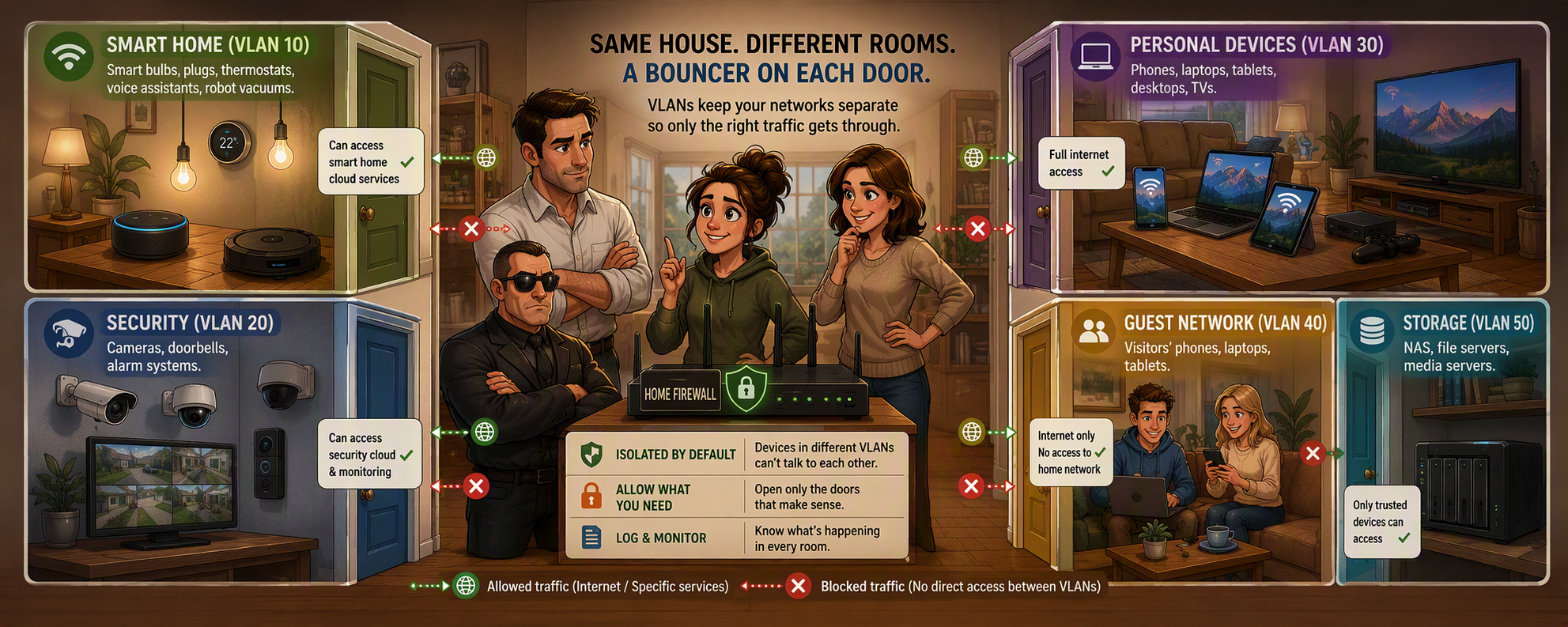

The short version: not every device in your house deserves the same level of trust or the same network. Group devices by what they need and what you'd lose if they got compromised, then keep those groups from talking to each other unless there's a real reason to.
Mesh or no mesh, there’s one more question worth asking. Now that everyone at the party has a decent seat and a decent voice, should they actually be able to hear each other?
For most households, the honest answer is no. Your smart light bulb has no business being able to see your laptop. Your security camera has no business phoning home to a server in a country you've never been to, carrying footage of your living room. And your weekend guests definitely don't need to be on the same network as your NAS.
This is what network segmentation actually solves. Same house, same internet connection, but different rooms, with a bouncer on each door deciding who's allowed through.
Meet the VLAN, the bouncer's rulebook
Most stock routers hand every device the same single network, one big open room where everything can theoretically see everything else. A proper setup splits that room into several, called VLANs: virtual networks that share the same physical hardware but stay logically apart. Each VLAN gets its own SSID for the Wi-Fi ones, its own IP subnet, and its own firewall rules governing who can talk to whom.
Here's roughly how we'd carve up a typical smart home, in order of VLAN number.
VLAN 10, Trust: phones, tablets, laptops, TVs, streaming boxes, consoles, desktops
This is where the people you actually live with hang out. Phones, tablets, and laptops belong here on 5GHz or 6GHz, since they need speed and don't need range through three walls. TVs and streaming boxes belong here too, wired connectivity where possible, 5GHz where cables are ugly or not possible; they're not particularly sensitive, they just want a stable, fast connection to Netflix. Gaming consoles and desktop PCs sit here as well, wired if latency matters to you, otherwise 5GHz or 6GHz.
Devices on this VLAN get to initiate conversations with the other rooms. Your phone can open the smart front door app and talk to the lock. The lock doesn't get to talk back into this room uninvited.
VLAN 15, Cameras / Locks / Security: security cameras, video doorbells, NVR, smart locks, access control
This tier is for anything where a compromise means someone else can watch your house or walk into it. Cameras and NVR sit here for the reasons we've covered before: wire them in with PoE where you can, and if you're running a local NVR rather than a cloud subscription, there's a genuine privacy case for keeping this VLAN off the internet entirely.
Smart locks belong here too. A lock is a different kind of device to a light bulb: getting it wrong doesn't just mean a stranger can see your lounge room, it means they can open your front door. Whether your lock talks Wi-Fi directly or sits behind a Zigbee hub, treat it with the same suspicion as the cameras, not the same casualness as the bulbs.
VLAN 20, Servers: your smart home hub, NAS, anything acting as infrastructure rather than a client
This is the room for devices that other devices need to reach, but that don't belong out with the general population either. Your Home Assistant or openHAB box lives here, and so would a NAS or print server if you're running one.
Think of your hub as a translator with a backstage pass. It needs to reach VLAN 50 to actually control your IoT devices, VLAN 15 to pull camera feeds into a dashboard or send a lock command, and it needs to answer VLAN 10 so your phone can open the app and ask it to do something. Every other device stays in its own room; the hub is the deliberate exception, and it's worth writing that exception into your firewall rules on purpose rather than leaving broad access lying around by accident. If you're building this out with our NUC + Aruba Instant On bundle, this is the VLAN your NUC sits on.
VLAN 40, Guests: visitors' phones and laptops
A dedicated guest SSID, internet-only, isolated from every other VLAN and from other guest devices too. Your mate's phone doesn't need to see your NAS, and it definitely doesn't need to see the guest sitting next to them on the couch either.
VLAN 50, IoT: bulbs, plugs, sensors, robot vacuums, smart appliances, solar and energy gear
The 2.4GHz SSID you're probably already thinking about, and it earns its own VLAN, not just its own band. Bulbs, plugs, sensors, and robot vacuums all sit here for the reasons we've covered: cheap firmware, infrequent updates, and a genuine track record of being the easiest way into a home network.
Solar inverters, EV chargers, and smart energy monitors sit here as well by default. They're usually cloud-connected in the same casual way a smart bulb is, so they get the same treatment: internet allowed, everything else denied, no direct line to VLAN 10 or VLAN 20. If you're pulling live generation or usage data into a local dashboard on your hub, that's exactly the kind of deliberate exception VLAN 20 is built to carry, rather than opening the whole IoT VLAN up to compensate.
Firewall the whole VLAN from reaching VLAN 10 and VLAN 20 in either direction, and from reaching itself. If one bulb gets compromised, it shouldn't be able to go looking for your laptop, or for the bulb next to it.
Give every room the same number on the door
One small habit that pays off later: make the third octet of each subnet match its VLAN ID. VLAN 10 becomes 192.168.10.0/24, VLAN 15 becomes 192.168.15.0/24, VLAN 20 becomes 192.168.20.0/24, and the same all the way down.
It looks like a cosmetic choice, but six months from now when you're reading a firewall log at 11pm trying to work out why the camera can't reach the NVR, being able to read the VLAN straight off the IP address saves you a lookup every time. No spreadsheet required, no digging through the controller to remember which VLAN was which. The number's right there in the address.
Name your SSIDs like you named your subnets
Same logic, different layer. VLAN 10 gets your main SSID, something like "Home". VLAN 50 gets "Home-IoT". VLAN 40 gets "Home-Guest". Keep the naming boring and consistent; the SSID doesn't need to be clever, it needs to tell you and anyone else in the house which room a device is about to walk into before they connect.
VLAN 15 and VLAN 20 usually don't need an SSID of their own. Cameras and locks are wired in over PoE, joined through the hub's own pairing process for Zigbee, Z-Wave, or Thread devices, or occasionally set up over Wi-Fi once during initial pairing and then left alone; they're not devices anyone is manually picking from a Wi-Fi list day to day. The server VLAN is generally wired hardware entirely, so it doesn't need a broadcast SSID at all. If you do end up with a Wi-Fi camera or lock that has to join wirelessly, put it on the VLAN 15 subnet through the controller rather than inventing a separate SSID just for it.
Quick reference: the seating chart
| Device type | Connection | VLAN | Subnet | SSID | Reaches other VLANs? |
| Phones, tablets, laptops | 5GHz/6GHz | 10, Trust | 192.168.10.0/24 | Home | Yes, can initiate to any VLAN |
| TVs & streaming boxes | Ethernet or 5GHz | 10, Trust | 192.168.10.0/24 | Home | Yes, can initiate to any VLAN |
| Gaming consoles & desktops | Ethernet or 5GHz/6GHz | 10, Trust | 192.168.10.0/24 | Home | Yes, can initiate to any VLAN |
| Security cameras & NVR | Wired PoE preferred | 15, Cameras/Locks/Security | 192.168.15.0/24 | n/a | No, local NVR only |
| Smart locks & access control | Wi-Fi or Zigbee via hub | 15, Cameras/Locks/Security | 192.168.15.0/24 | n/a | No |
| Smart home hub, NAS | Wired preferred | 20, Servers | 192.168.20.0/24 | n/a | Deliberately reaches 15 and 50, answers 10 |
| Guest devices | Dedicated guest SSID | 40, Guests | 192.168.40.0/24 | Home-Guest | No, internet only |
| IoT, solar & energy gear | 2.4GHz | 50, IoT | 192.168.50.0/24 | Home-IoT | No, internet only |
Why this needs real hardware, not just a checkbox
Most routers you get handed on day one from your internet provider can do one SSID, maybe two if you're lucky, and nothing resembling real inter-VLAN firewall rules. This kind of segmentation needs an access point and gateway that were actually built for it.
This is exactly the sort of setup our NUC + Aruba Instant On bundle is built around: proper multi-SSID, multi-VLAN Wi-Fi backed by a small, quiet box doing the routing and firewall work behind it. There are a few different bundle configurations depending on how much of the house you're covering, worth a look if you'd rather have this set up properly once than keep patching a single flat network.
Coming up
Once every device has the right seat in the right room, the next question is what happens when a dozen of them all want to talk to the host at exactly the same moment. That's where MU-MIMO comes in, and whether it actually lives up to the marketing.