Skip to content

TP-Link Omada: Business-Grade Control, Home-Sized Price

  • Enterprise-style networking with a free controller you can run in the cloud or host yourself on your own hardware, with no license fees and no subscription.
  • Built for real network segmentation, isolating guests, cameras, and IoT devices from the rest of the home with VLANs and firewall rules instead of leaving everything on one flat network.
  • Backed by a 5 year warranty on indoor access points, switches, and gateways, which is a proper safety net for hardware you plan to install once and forget.
omada_port

 Why TP-Link Omada Is Our #2 Pick 

What we love:

  • Real network segmentation: separate zones for trusted devices, guests, cameras and locks, and IoT gear, backed by stateful ACLs on the gateway so the isolation is enforced, not just suggested.
  • You choose where the controller lives. Use the free cloud option for zero-touch setup, or run the Omada Software Controller on your own NUC and keep everything local. The software controller is free, and it gives you the deepest feature set, including packet capture, diagnostics, and captive portal options.
  • Far more visibility than the competition: a live topology map, per-client and per-device statistics, and event logs, so tracking down that intermittent drop-out weeks later is actually possible.
  • Room to grow. The same ecosystem scales from one access point and a gateway to a full multi-site setup, and there is a deep range of Wi-Fi 6 and Wi-Fi 7 access points in ceiling, wall plate, and desktop formats to suit how your home is built.
  • 2.5Gbps WAN capable gateway options, such as the ER707-M2 with its 2.5G WAN port and roughly 2.3Gbps of NAT throughput, so a Home Hyperfast NBN plan isn't bottle-necked by the gateway itself. On a plan below that, the gigabit ER605 handles it without issue.
  • Automatic and batch firmware upgrades, with reboot scheduling so updates land at a quiet time rather than mid-movie night.
  • Turn an SSID off from the phone app in seconds. Handy for troubleshooting, and just as handy when the kids need the Wi-Fi switched off until they do as they're told.

What we don't:

  • More knobs means more ways to trip over one. The controller has a lot of settings, and a first-time setup takes longer than Aruba's guided app. It is worth doing properly once, which is exactly why we offer the bundles below.
  • The controller options are not identical. The free cloud option (Cloud Essentials) is intentionally light: it has no ACLs, no IPS/IDS or DPI, no PPSK, and no packet capture, and it needs an internet connection to manage anything. The features we rely on for segmentation live on the software or hardware controller.
  • If you self-host the controller, it is one more thing that has to stay running. The network keeps passing traffic without it, but you can't change settings while it's down. A NUC solves this neatly, but it is still a box you own.
  • Firmware polish can be uneven. Updates are frequent and generally good, but we recommend reading the release notes rather than blindly updating the day something lands.
  • Outdoor gear carries a shorter warranty (3 years) than indoor gear (5 years). Fine for most homes, but worth knowing if you're covering a big yard.

 Our take: 

A smart home is not one thing, it is many different devices. Every bulb, sensor, camera, and hub you add brings its own firmware, its own update cycle, and its own risk profile, and once a house is running twenty or thirty of these, treating them all the same as a laptop or phone stops making sense. Omada gives you the tools to do that properly, with each type of device on its own segment doing its job and nothing else.

Why isn't it our #1? Because it asks a little more of you. Aruba Instant On wins on set-and-forget: cloud managed, guided, and almost nothing to configure. Omada wins on depth and control. If you're the kind of person who wants to see the logs, write your own firewall rules, run the controller on your own hardware, and have an upgrade path to a much bigger network, Omada is the better fit, and in our view the best value in the prosumer market. If you want to plug it in and never think about it again, go Aruba.

The trade-off is honest and it cuts both ways. You get more power for the money, and in return you accept a longer setup and a controller with more settings than most homes will ever touch. For the right household, that is exactly the right trade.

If you want the full breakdown of how we structure these zones room by room, our guide to device segmentation walks through it in detail.

Beacon_Logo

Starter Bundle

Ideal for apartments or small homes starting their smart home journey.

$772.64 inc GST


What's included

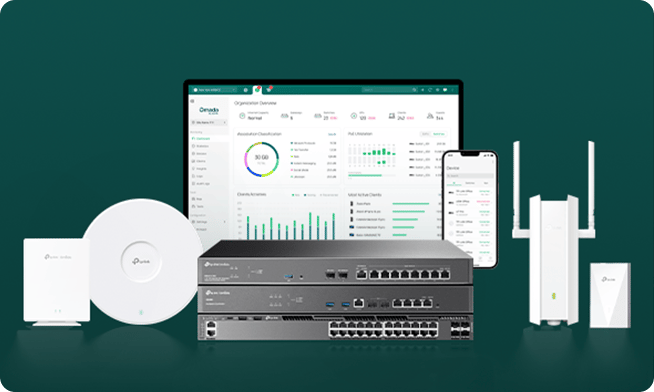
  • TP-Link ER707-M2 Multi-Gigabit VPN Gateway
  • TP-Link ES210XPP-M2 8-Port 2.5G PoE++ Easy Managed Switch (fanless)
  • TP-Link EAP650-Desktop (radios: 574/2402Mbps respectively, powered over PoE+)

Optional add-ons

  • Omada Cameras
  • Smart Home Controller
  • Installation
  • Ongoing support

*Installation covers mounting hardware and network configuration. If new ethernet cabling needs to run through walls or between floors, a licensed electrician or cabler may be needed as a separate cost, we'll flag this during your site assessment before any work is booked. See what's involved


Buy the Starter Bundle

Horizon_Logo

Whole-Home Bundle

For larger homes needing full-coverage Wi-Fi and proper network segmentation.

$1970.74 inc GST


What's included

  • TP-Link Omada Fusion 2.5G Gateway (built-in Omada controller) 
  • TP-Link SG3218XP-M2 16-Port 2.5G Managed Switch with 8-Port PoE+
  • 2 x TP-Link EAP770 Wi-Fi 7 Access Points (radios: 688/2880/5760Mbps respectively, powered over PoE+)

Optional add-ons

  • Omada Cameras + NVR
  • Smart Home Controller
  • Installation
  • Ongoing support

*Installation covers mounting hardware and network configuration. If new ethernet cabling needs to run through walls or between floors, a licensed electrician or cabler may be needed as a separate cost, we'll flag this during your site assessment before any work is booked. See what's involved


Buy a Whole Home Bundle

Nexus_Logo

Advanced Bundle

For larger homes needing the best Omada has to offer

$6911.97 inc GST


What's included

  • TP-Link Omada Fusion 2.5G Gateway (built-in Omada controller)
  • TP-Link SX3832MPP 32-Port 10G L2+ Managed Switch with 24-Port PoE++
  • 3 x TP-Link EAP770 Wi-Fi 7 Access Points (radios: 688/2880/5760Mbps respectively, powered over PoE+)

Optional add-ons

  • Omada Cameras
  • Smart Home Controller
  • Installation
  • Ongoing support

*Installation covers mounting hardware and network configuration. If new ethernet cabling needs to run through walls or between floors, a licensed electrician or cabler may be needed as a separate cost, we'll flag this during your site assessment before any work is booked. See what's involved


Buy an Advanced Bundle

msi_cubi_z_nuc

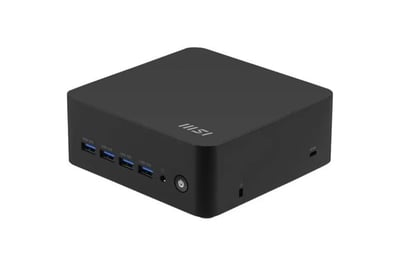
Build on the Omada platform with a Smart Home Hub

These two boxes do very different jobs, and it's worth being clear about which is which. Omada is the network: the gateway, switch, access points, the firewall, and the VLAN segmentation that keeps your cameras, locks, and IoT gear segmented from the rest of the house. The Hub is optional. It is a computer that provides services on your network.

If you add one, it can play multiple roles. First, and this is where Omada differs from Aruba, it can host the Omada Software Controller, so all your configuration, logs, and statistics stay on your own hardware instead of in someone else's cloud. (Note: The Whole Home and Advanced bundle's Fusion 2.5G gateway already has a controller built in, so the Hub is not required to be a network controller.) Second, it runs on top of the network: a local DNS cache and ad-blocker (Technitium, Pi-hole, or AdGuard that speeds up internet browsing and reduces Advertising), a NAS share for your own files, a Zigbee or Z-Wave coordinator for pairing smart home devices, an MQTT broker for device-to-device messaging, Frigate for local camera AI and NVR, Tailscale for secure remote access, and Uptime Kuma to keep an eye on all of it. It sits on its own VLAN as trusted infrastructure, the same way a NAS or smart home hub does in any network we design.

Not every build runs all of these, it depends on what your home actually needs. See our NUC builds page for recommendations on what you need.

Do I need to pay for the Omada controller?

 No. The Omada Software Controller is free to download and use, and TP-Link's cloud option, Omada Cloud Essentials, is free as well. The software controller is the one we recommend for smart homes, because it includes the features that make segmentation worthwhile, like ACLs and packet capture. If you'd rather not leave a laptop running, add a NUC to any bundle and it runs the controller for you. 

What happens if the controller goes offline?

 Your network keeps working. Routing, Wi-Fi, and your VLANs run on the devices themselves, so everyday traffic carries on. What you lose while the controller is down is the ability to change settings and see live statistics. That's why, if you self-host, we run it on a NUC that stays powered on, rather than on a laptop that goes to sleep. 

Will Omada work with Home Assistant or openHAB?

 Yes. Omada has community integrations for Home Assistant, which can surface things like which devices are home and access point health. Because your hub sits on its own VLAN (VLAN 20 in our layout), we set the firewall rule that lets it reach your IoT and camera networks, and only those. [Link to HAOS platform page.] 

Do I need Wi-Fi 7 access points?

 Not for your internet plan. Most Australian home plans are well inside what a good Wi-Fi 6 access point can deliver. Wi-Fi 7 matters if you move large files between devices on your own network, or you want headroom for the next few years of devices. We're happy to size it to your household. See The Front Door Problem for how plan speed, router, switch, and access points need to line up. 

Will I need an electrician?

 Possibly, depending on your home. Our (optional) installation covers mounting your hardware and configuring the network itself. If your home needs new ethernet cabling run through walls, ceilings, or between floors to get access points where they need to be, that's usually a separate job for a licensed electrician. We'll tell you during your site assessment, before anything's booked, whether that applies to your home. Click here to see our Installation page.

Omada or Aruba Instant On?

 Aruba is our #1 pick for most households because it's simpler to live with. Choose Omada if you want deeper visibility, more control over firewall rules, a self-hosted controller, or a network you expect to grow. If you're not sure, ask us and we'll help you pick based on your home rather than a spec sheet. 

How long is the warranty?

 Most Omada indoor access points, switches, and gateways carry a 5 year warranty in Australia with some older products having a 3yr warranty only. Outdoor gear carries 3 year warranty.