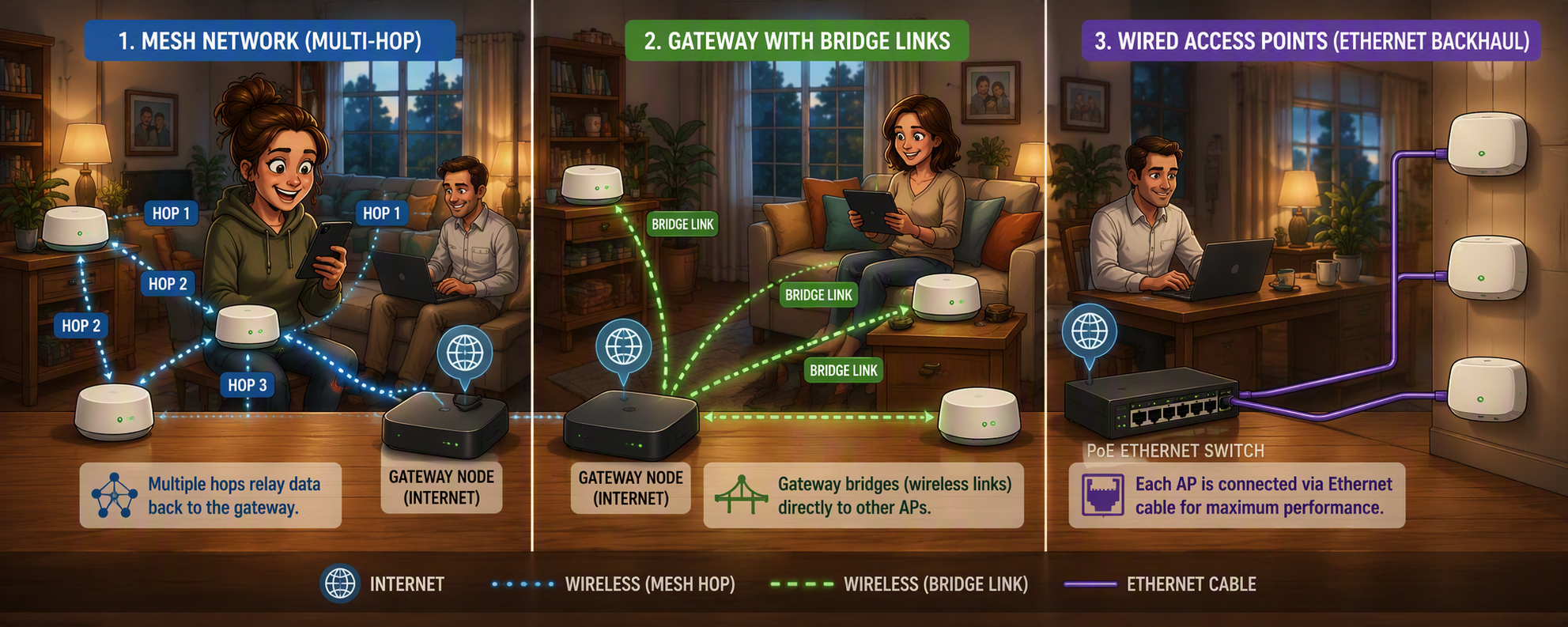
The short version: mesh solves one specific problem, a home too big or too oddly shaped for one access point to cover, and it gets chosen far more often than that problem actually exists.
Walk into JB Hi-Fi or Harvey Norman and you'll find a wall of boxes all promising to fix your Wi-Fi: routers, extenders, mesh kits, from TP-Link, Ubiquiti, Netgear, Google, Orbi, and everyone else with a logo. Somewhere in there is a young staff member who's genuinely keen to help and has probably never run any of it. That's not a dig at them, it's just not their job to know; it's their job to sell you a box.
Here's a detail worth knowing before you're standing in that aisle: most households replace their networking gear every five years or so, while phones get replaced every two to three, tablets and laptops every three to five. Your phone almost always has newer Wi-Fi technology in it than your router does. So the router, the one piece of hardware setting the limit for your whole network, is usually the thing people don't upgrade.
What's actually in that aisle
A Wi-Fi router is the all-in-one box: it connects to your internet, usually has a handful of ethernet ports on the back, and broadcasts Wi-Fi through the house. It's what most people already have, often because your internet provider handed it over on day one.
Then there's mesh, and here I'll be honest: I'm not a fan, not because the technology is bad, but because it's become the answer everyone reaches for regardless of whether it's actually the right one. It's the default recommendation on every forum and social media group for basically any Wi-Fi complaint, and a very effective marketing word for every vendor selling into households.
Where mesh actually comes from
Real mesh networking was built for places like mine sites and stretches of railway: locations with power but no reliable path back to the internet. One node in the group typically had gateway, a physical connection back to the internet or a private network, and a series of other nodes passed traffic between them to reach it. Each node had one or more backhaul links to the gateway providing multiple paths for redundancy. That's a genuinely clever solution to a genuinely hard problem. It's also important to understand the traffic type used on the original mesh networks. Mine sites and railways mainly provided telemetry data for controlling large machinery. Then basic web and email was allowed, and finally low quality voice. Small packets of data that could be repeated easily.
Not every product sold as mesh today actually works that way. Some create a simple point-to-point link between your main unit and each satellite/node, with the satellites never talking to each other directly. Others do allow satellites to talk to one another. Read the fine print on your purchase before you assume you're getting a true mesh capable product!
The catch nobody puts on the box
Here's the part that matters most as we refer back to the analagy. Every mesh node, extender, or bridge you add is another guest at the party who has to listen to the whole conversation and then repeat it, often on the very same channel it just heard it on. That repeating costs airtime, and airtime is the one thing Wi-Fi never has enough of. If your satellite doesn't have its own dedicated channel just for talking back to the main unit, you can end up losing a meaningful chunk of your bandwidth just to the retelling. Mesh was originally designed for small telemetry packets, vendors today use it for streaming TV & movies and It is horribly inefficient!
So before spending real money on a mesh kit, it's worth asking the boring question: would fifteen hundred dollars on mesh actually fix this, or would a few hundred dollars and an electrician running a Cat6 cabling to a second, well-placed access point fix it better, and permanently, with no repeating required? For most two storey homes in Australia, the honest answer is that two well placed access points, is always going to outperform a mesh kit covering the same space.
Where that leaves us
Once the hardware is sorted, there’s still a question nobody asks at the checkout: now that everyone has a seat at the party, should they all be able to hear each other? Your smart bulb, people sensors, automatic blinds, temperature and humidity sensors, solar and battery, security cameras and your laptop probably shouldn’t be on speaking terms. That’s next: The Seating Chart, which devices belong on which network.