Skip to content

Juniper Mist: The Network Your Office Would Envy, Designed for Your Home

  • The same cloud-managed platform that runs hospitals, universities, and retail chains, sized down for a house that has outgrown consumer and prosumer gear.
  • Built around a proper security gateway, not a router with a firewall bolted on. Cameras, locks, guests, and IoT devices are separated by policy that is enforced at the gateway. We manage the gateway and switching locally, so your firewall does not depend on a cloud subscription.
  • Every home is quoted individually. We survey the house, design the network, and price the whole solution as one package, so you are never buying a box and hoping it fits.
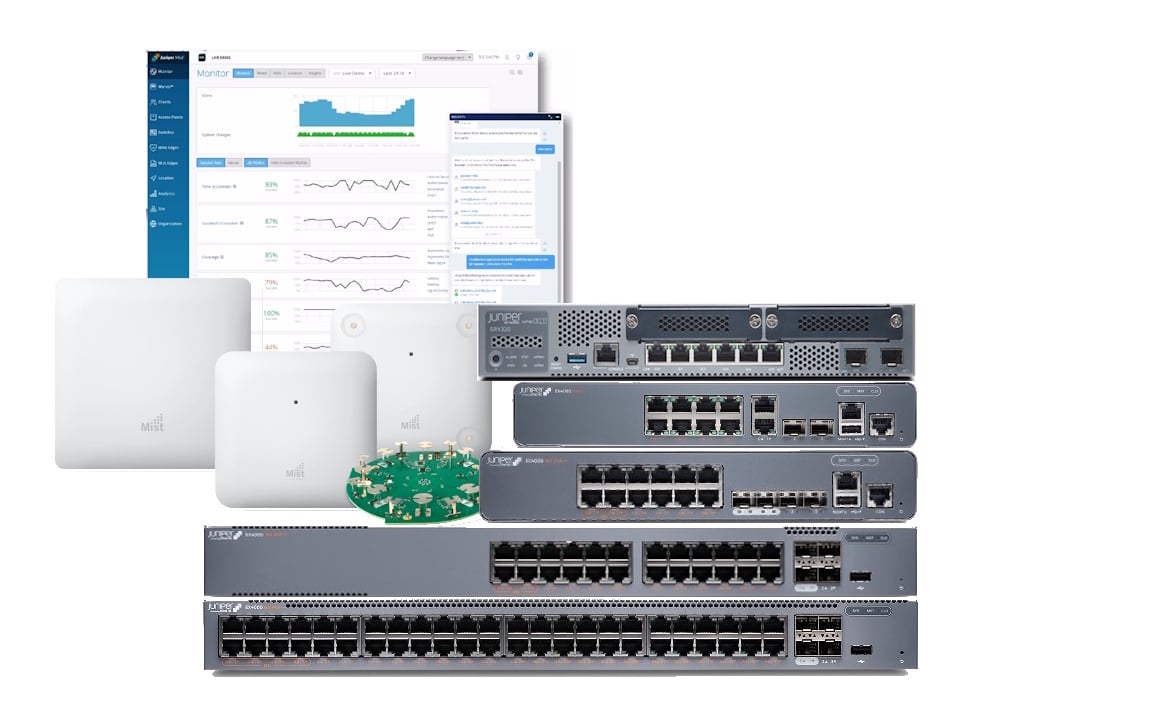
Juniper_Portfolio

 Why Juniper Mist Is Our #3 Pick  

What we love:

  • Enterprise-grade Wi-Fi. Mist access points can carry a dedicated scanning radio that measures the airwaves continuously, so the system tunes channels and power for your house rather than guessing once at install and hoping.
  • Genuine visibility into what your Wi-Fi is doing. Instead of “the Wi-Fi is slow”, you can see whether the problem is the device, the access point, the switch port, or the internet connection, and when it started.
  • A real firewall at the front door. Juniper’s SRX gateways are business security appliances, with zone-based policy that suits a segmented smart home where cameras, locks, IoT gear, and guests each get their own rules.
  • The right management for each layer. The gateway and switches can be  managed directly by us with no cloud licence needed so your firewall and wired network don’t depend on a subscription to keep running. Alternatively they can be cloud managed with a subscription on the same AP dashboard. The Wi-Fi is managed in the Mist cloud, where the AI-driven tuning and visibility are live.
  • Built for growth and for demanding homes. Large properties, home offices, multiple buildings, and granny flats are the kind of layouts this platform handles without breaking a sweat.
  • Wi-Fi 6E and Wi-Fi 7 access point options, from an entry-level tri-band model up to a flagship Wi-Fi 7 unit with a tri-band data radio set plus a dedicated scanning radio.
  • We do the design and commissioning. This is not a product you should have to learn from scratch, and you don’t have to.
What we don't:

  • It is the most expensive option we offer, and it isn’t close. The hardware is business-class and the platform is licensed like one.
  • The Wi-Fi is a subscription. Mist access points are cloud managed and need an active Wi-Fi subscription to operate. The gateway and switches *don’t, because we can manage those directly, but the access points are the part you see and use every day. Stop paying and the Wi-Fi stops being manageable.
  • The access point warranty is tied to that subscription. Indoor access points are covered for at least a year, and replacement after that continues only while the subscription stays active. Outdoor access points carry the standard one year. Compare that with the five years Omada includes with no ongoing fee.
  • There is no (realistic) self-hosted option for the Wi-Fi. Access points are managed from Juniper’s cloud, so the network keeps passing traffic without the internet, but you can’t change Wi-Fi settings or view live analytics until it is back.
  • It is more network than most homes need. A three-bedroom house with a dozen smart devices will be better served, and better off, with Aruba or Omada.
  • Access point control is not designed for tinkering. Mist is built for professionals, and the deep tooling is aimed at IT teams rather than a homeowner poking around on a weekend. That is a strength when we manage it with you, and a hurdle if you want to run it solo.
  • The new SRX400 Security Gateway only has 1Gbps ethernet connections! Our NBN is already offering 2Gbps speeds and Juniper are still on 1Gbps on the entry level Router. 

 Our take: 

Most homes should not buy this, and we will tell you so. Juniper Mist earns its place for a small group of households: large or complex properties, homes with an office or a home business, people running a lot of cameras and connected systems who want the firewall taken seriously, and anyone who already knows and trusts the platform from work.

For those households the trade is clear. You pay more up front, you pay a Wi-Fi subscription for as long as you run it, and in return you get the best visibility, the strongest gateway, and the most professional Wi-Fi we offer. If a network problem would cost you money or a working day, this is a sensible purchase. If it would just annoy you, it isn’t.

That is why it sits at #3. It's not that Mist is worse - quite the opposite. It's that Aruba and Omada suit far more homes at a far lower total cost of ownership, and we would rather point you to the right tool than the impressive one.

If you want to see how we would structure the zones in your home, our guide to device segmentation walks through it room by room.

Nexus_Logo

Advanced Bundle

For homes adding cameras, locks, and other PoE-hungry security gear that needs its own segment.

$10k plus inc GST


What's included

  • Juniper SRX400 Security Gateway
  • Juniper EX4000-24MP
  • 3 x Juniper AP27 Wi-Fi 7 Access Points (radios: 688Mbps/2.9Gbps/5.8Gbps PoE+)

Optional add-ons

  • Reolink Cameras
  • Smart Home Hub
  • Installation
  • Ongoing support
  • 5 year Warranty and Mist subscriptions ($5500inc)

*Installation covers mounting hardware and network configuration. If new ethernet cabling needs to run through walls or between floors, a licensed electrician or cabler may be needed as a separate cost, we'll flag this during your site assessment before any work is booked. See what's involved


Buy an Advanced Bundle

msi_cubi_z_nuc

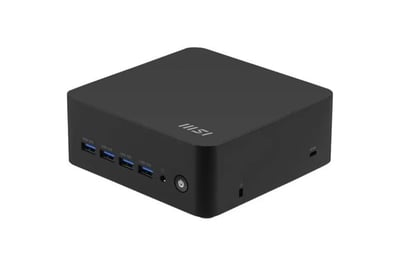
Build on your Juniper Network with a Smart Home Hub

Add a smart home hub to any Juniper build

Your Juniper gear is the network. The gateway, switch, and access points move traffic, enforce the firewall, and keep your cameras, locks, and IoT devices separated from the rest of the house. That is all they are designed to do, and they do it very well.

A smart home hub is different. It is a small, always-on computer that sits on the network and runs the services that make a smart home work locally, rather than relying on someone else’s cloud:

  • A local DNS cache and ad-blocker (Technitium, Pi-hole, or AdGuard) for faster, cleaner browsing across every device
  • A NAS share, so your files stay on your own hardware
  • A Zigbee or Z-Wave coordinator for pairing smart home devices without vendor hubs
  • An MQTT broker for fast device-to-device messaging
  • Frigate for local camera AI and recording, with no footage leaving the house
  • Tailscale for secure remote access without opening ports on your firewall
  • Uptime Kuma to keep an eye on all of it

The advantage is control. Your automations keep running when the internet drops, your camera footage and files stay private, and you aren’t locked into any one brand’s app or subscription. The hub sits on its own VLAN as trusted infrastructure, so the Juniper firewall decides exactly which devices it can talk to.

It’s optional, and not every build runs all of these. It depends on what your home actually needs. See our smart home hubs page for how we configure it for different setups.

Do I need to pay for the Omada controller?

 No. The Omada Software Controller is free to download and use, and TP-Link's cloud option, Omada Cloud Essentials, is free as well. The software controller is the one we recommend for smart homes, because it includes the features that make segmentation worthwhile, like ACLs and packet capture. If you'd rather not leave a laptop running, add a NUC to any bundle and it runs the controller for you. 

What happens if the controller goes offline?

 Your network keeps working. Routing, Wi-Fi, and your VLANs run on the devices themselves, so everyday traffic carries on. What you lose while the controller is down is the ability to change settings and see live statistics. That's why, if you self-host, we run it on a NUC that stays powered on, rather than on a laptop that goes to sleep. 

Will Omada work with Home Assistant or openHAB?

 Yes. Omada has community integrations for Home Assistant, which can surface things like which devices are home and access point health. Because your hub sits on its own VLAN (VLAN 20 in our layout), we set the firewall rule that lets it reach your IoT and camera networks, and only those. [Link to HAOS platform page.] 

Do I need Wi-Fi 7 access points?

 Not for your internet plan. Most Australian home plans are well inside what a good Wi-Fi 6 access point can deliver. Wi-Fi 7 matters if you move large files between devices on your own network, or you want headroom for the next few years of devices. We're happy to size it to your household. See The Front Door Problem for how plan speed, router, switch, and access points need to line up. 

Will I need an electrician?

 Possibly, depending on your home. Our (optional) installation covers mounting your hardware and configuring the network itself. If your home needs new ethernet cabling run through walls, ceilings, or between floors to get access points where they need to be, that's usually a separate job for a licensed electrician. We'll tell you during your site assessment, before anything's booked, whether that applies to your home. Click here to see our Installation page.

Omada or Aruba Instant On?

 Aruba is our #1 pick for most households because it's simpler to live with. Choose Omada if you want deeper visibility, more control over firewall rules, a self-hosted controller, or a network you expect to grow. If you're not sure, ask us and we'll help you pick based on your home rather than a spec sheet. 

How long is the warranty?

 Most Omada indoor access points, switches, and gateways carry a 5 year warranty in Australia with some older products having a 3yr warranty only. Outdoor gear carries 3 year warranty.